 Piper's Songbook
Learning recorder · A practical guide
Apps to learn recorder, compared.
Four apps listen to a real recorder through the microphone and tell you whether each note was right: Piper’s Songbook, tonestro, Flute Master and Tutti Fluty. They differ in what they tell you after a wrong note, what they cost, and whether they run on a phone or in a web browser. [1][2][3]
Written by Piper’s Songbook, one of the apps compared. The other three descriptions were checked on 13 November 2026. This compares published features and our own app demonstration. We did not test all four apps side by side.
How do the recorder learning apps compare?
All four use a real recorder and the device’s microphone. Start with the row that matters most to you: the device you have, the price, or what the app says when a note goes wrong.
| Your decision | Piper’s Songbook | tonestro | Flute Master | Tutti Fluty |
|---|---|---|---|---|
| Runs on | Android 8.0 or newer, phone or tablet. | iPhone and iPad with iOS 15 or newer, and Android 8 or newer with at least 4 GB of memory. It needs an internet connection. [1] | Phones and tablets, through Google Play and the App Store. [2] | A web browser, with nothing to install. [3] |
| Cost | Free to install, with no ads. Hot Cross Buns and Piper’s First Gig are free. The rest of the course comes with the full songbook, bought in the app. | A subscription. Its page offers a 7-day free trial with the yearly plan. [1] | Free to try. Its listing describes a one-time purchase that unlocks all the songs. [2] | Its 21 lessons and 21 songs are free. Extra song packs are paid once. [3] |
| Feedback while playing | Names the note it heard and suggests a finger change. See the recorded example below. | Shows whether each note was in tune and in time. Notes that are both turn green. [1] | Detects notes as you play and scores them inside a story game. [2] | Listens to each note. With a camera on, it draws the fingering over a picture of your hands and marks the finger to fix. It also works by ear alone. [3] |
| Practice format | Short phrases, fingering diagrams and a course starting with B, A and G. Course order. | Step-by-step courses, songs with backing music, practice at 80% or 60% speed and weekly challenges. [1] | A dragon-and-bats story, coloured notation, 30 backing tracks and medals. [2] | One new note in each lesson with a short tune, and three games you steer by playing. [3] |
| Recorder size | Soprano or tenor in C. Alto and bass are not supported. | Soprano. Its page says the alto recorder is not supported. [1] | Soprano. We have not verified other sizes. [2] | Soprano or alto. [3] |
| Fingering systems | Baroque and German. Choose the matching setting before practice. | The page checked does not name the fingering systems it supports. Check before choosing it for a German recorder. [1] | Baroque and German. [2] | Baroque and German. [3] |
| Reason to look elsewhere | An app cannot watch your hold or hand tension. Use a teacher when you need that help. | Its recorder course is for soprano. For alto or tenor, choose another app. [1] | The story is designed around children. If that does not appeal, compare a phrase-based course. [2] | Lessons run on its website. If you want an installed phone app, compare the other three. [3] |
Which recorder app should you try first?
Piper for a specific fingering correction
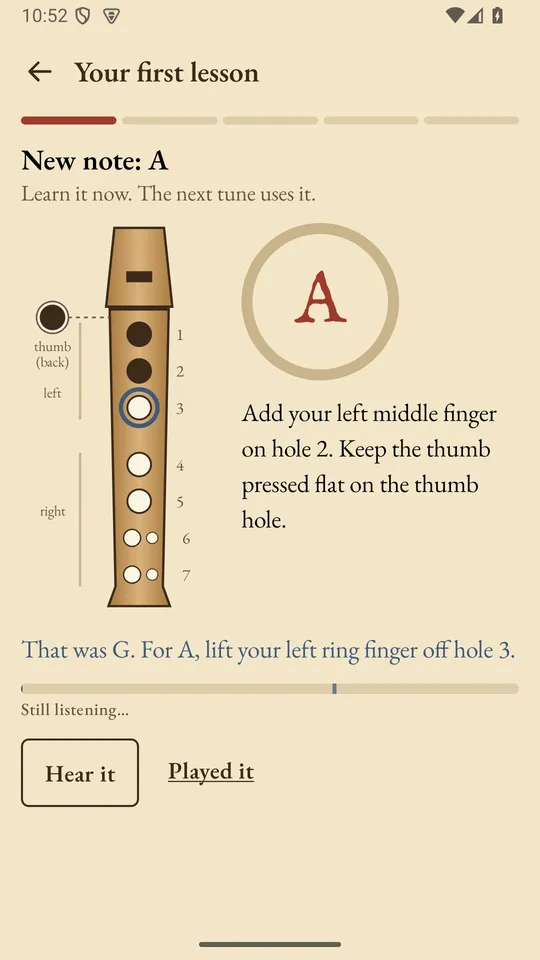
In our recorded app example, the score asks for A and the player produces G. Piper names G and tells the player to lift the left ring finger from hole 3. That is a useful reason to try Piper if your question is “which finger should I move?” The microphone does not see your fingers; the suggestion comes from the note it heard and the target fingering.
tonestro for accompaniment and challenges
If backing music and a weekly shared challenge would give you a reason to practise, those are explicit parts of tonestro’s recorder offer. Its page also describes slower practice at 80% or 60% speed. Its page lists iPhone, iPad and Android. We have not tested whether its feedback is more or less accurate than Piper’s. [1]
Flute Master for a child who wants a story game
Flute Master’s listing describes helping a little dragon while playing the recorder. It also describes coloured sheet music, medals and hints from the microphone. That is a concrete alternative for a child who prefers a game to working through phrases. Let the child see the style before choosing; the story is a preference and the listing gives no evidence that it teaches faster. [2]
Tutti Fluty to start in a browser without installing
Tutti Fluty was formerly called Recorder Hero. Its recorder lessons run on a website, so you can try one on a laptop or a school computer with a microphone. Of the four, it is the only one whose page says it supports an alto recorder, and the only one that describes using a camera to show fingerings on your own hands. Its site says the camera picture and the sound stay on your device. [3]
Common questions about recorder apps
What is the best app to learn recorder?
No one app is best for everyone, because the four that listen do different jobs. Choose Piper’s Songbook if you want to be told which finger to move after a wrong note. Choose tonestro for backing music, Flute Master for a child who likes a story game, and Tutti Fluty to start in a browser without installing anything.
Is there a free app to learn recorder?
Tutti Fluty’s lessons are free in a browser, with paid song packs as an extra. Piper’s Songbook is free to install with no ads, and Hot Cross Buns and Piper’s First Gig are free; the rest of its course is paid. Flute Master is free to try with a one-time purchase, and tonestro offers a 7-day free trial with its yearly plan.
Is there a recorder app that listens to you play?
Yes. Piper’s Songbook, tonestro, Flute Master and Tutti Fluty all listen to a real recorder through the microphone. Each one needs a quiet room and an actual instrument.
Is there an app that tells you which recorder note is wrong?
Piper’s Songbook names the note it heard and the finger to move, for example “I heard G. For A, lift your left ring finger off hole 3.” According to their own pages, tonestro turns a note green when it is in tune and in time, and Tutti Fluty shows what to fix after a wrong note.
Which recorder app is best for kids?
Flute Master is built for children, with a dragon story, coloured notes and medals. Tutti Fluty is also aimed at children, who play through a parent’s or teacher’s account. Piper’s Songbook teaches through short phrases, and an adult sets up the phone and stays nearby for the first sessions. Our guide to helping a child learn covers that.
Is there a recorder learning app for Android?
Yes. Piper’s Songbook runs on Android 8.0 or newer, and tonestro and Flute Master both have Google Play listings. Tutti Fluty runs in a web browser.
Compare with the same first phrase
Before choosing an app, play B, A, G; B, A, G from our first lesson. B and A each last one beat; G lasts two. Then use each app’s introductory exercise with the same recorder in the same quiet room.
- Can you understand what to change after a wrong note?
- Can you repeat a short section slowly?
- Does the app leave you wanting to play the next phrase?
Those are questions for your own trial. We did not measure them. If the main problem is a leaking hole or uncomfortable hands, read the squeak checks or ask a teacher to watch you before switching apps. If you have not played a note yet, start with how to play the recorder.
Sources and limits
We used the product descriptions linked below, checked on 13 November 2026. Publisher descriptions are evidence of advertised features. They do not prove how well an app performs. We did not run a head-to-head accuracy, retention or learning-speed test. An unmentioned feature is unknown, which is different from absent. Features and prices change, so check the provider’s current details before choosing.
- tonestro’s recorder course page.
- Flute Master’s publisher description on Google Play. It is also listed on the App Store.
- Tutti Fluty’s recorder page, formerly Recorder Hero.
Piper’s course and demonstration show our own practice format. For help with posture and tone, compare a teacher or a demonstration video.
Updated 13 November 2026.